




How to Choose the Right CPU Power Cables
Friday, January 16, 2026
CPU power cables, often overlooked in PC builds, play a critical role in system stability and performance. Selecting the appropriate cables ensures your processor receives clean, stable power without bottlenecks or risks. Here’s a detailed guide to help you make the right choice.
1. Understand CPU Power Connector Types
Modern motherboards typically use one or two CPU power connectors:
- 4-pin ATX12V: Found on older or basic motherboards, delivers up to ~150W.
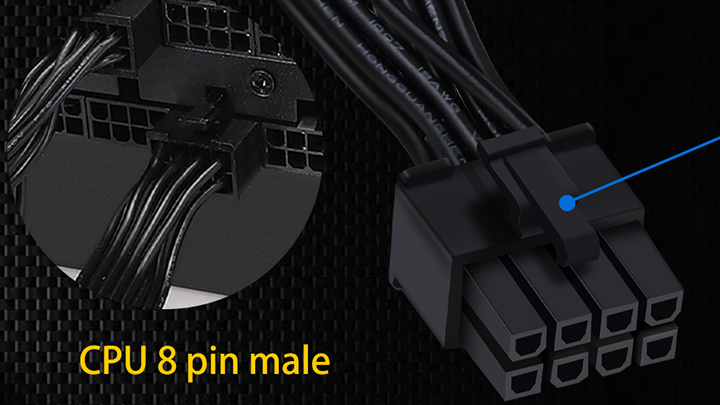
- 8-pin EPS12V (also called "CPU power"): Standard for most modern motherboards, delivers up to ~235W.
- 4+4-pin EPS: A split design compatible with both 4-pin and 8-pin sockets.
- Dual 8-pin (or 8+8): Used on high-end motherboards for extreme overclocking or high-TDP CPUs (e.g., Intel Core i9, AMD Ryzen 9), providing additional power headroom.
Check your motherboard manual to determine which connector(s) your board requires.
2. Power Supply Compatibility
- Modular vs. Non-modular: Modular PSUs allow you to attach only the cables you need, reducing clutter. Ensure any modular cable is specifically designed for your PSU model—never mix cables between different PSU brands or models, as pinouts can differ and cause severe damage.
- PSU Wattage Rating: Your power supply must have sufficient capacity. For high-end CPUs (e.g., Intel i9, AMD Ryzen 9), a quality 750W+ PSU is often recommended, especially when paired with a powerful GPU.
3. Cable Construction & Quality
- Wire Gauge (AWG): Thicker wires (lower AWG number, like 16 or 18 AWG) have less resistance and handle higher current more safely. For standard builds, 18 AWG is common; for high-power or overclocked systems, look for 16 AWG.
- Connector Quality: Gold-plated contacts resist corrosion and ensure better conductivity. The connector should fit snugly without excessive force.
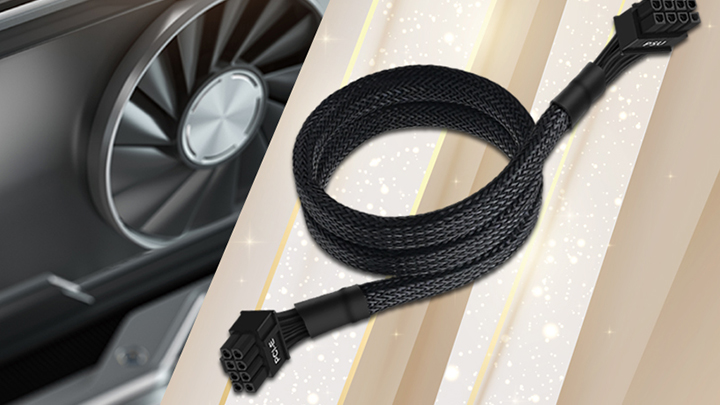
- Shielding & Protection: Look for cables with sleeving (nylon, paracord, or PVC) to protect wires and improve aesthetics. Some premium cables include capacitors to reduce electrical noise.
4. Length & Aesthetics
- Length: Measure the distance from your PSU to the motherboard’s CPU power socket (typically top-left corner). Standard lengths are 50–70 cm. Too short creates tension; too long adds clutter.
- Custom Sleeved Cables: Popular for aesthetic builds, these come in various colors and materials. Ensure they’re compatible with your PSU (or use extensions, though this adds extra connections).
5. Safety & Certification
- Safety Standards: Cables included with reputable PSUs meet safety regulations (UL, CE, RoHS). For aftermarket cables, verify they’re from trusted manufacturers.
- Pinout Verification: If purchasing custom or replacement cables, confirm the pinout matches your PSU exactly. Incorrect wiring can destroy your CPU, motherboard, or PSU.
6. Use Case Considerations
- Standard Office/Home PCs: The CPU cable included with your PSU is typically sufficient.
- Gaming/Workstation Builds: Use high-quality PSU cables (or quality extensions if needed). Ensure clean cable management to maintain airflow.
- Overclocking/High-Performance Systems: Opt for thick-gauge (16 AWG) cables and ensure all CPU power connectors on the motherboard are populated for stability.
7. Extensions vs. Replacements
- Extension Cables: Attach to your existing PSU cables for extra length or improved aesthetics. Ensure they have proper connectors and sufficient gauge (18 AWG minimum).
- Replacement Cables: Only use cables specifically designed for your PSU model, typically sold by the PSU manufacturer or trusted third-party vendors (like CableMod).
Checklist for Quick Reference
- Identify your motherboard’s CPU power socket type (4-pin, 8-pin, or dual 8-pin).
- Check PSU compatibility (wattage, modular pinout, included cables).
- Select appropriate wire gauge (16–18 AWG based on power needs).
- Measure required length for clean cable management.
- Verify safety certifications and connector quality.
- Consider aesthetic options if building a showcase PC.
- Never mix modular cables between different PSU models.
Common Pitfalls to Avoid
- Forcing Connectors: If it doesn’t fit easily, recheck alignment—forcing can damage pins.
- Using Non-Compatible Modular Cables: This is the most common cause of hardware failure.
- Ignoring Power Needs: An underspecifiied PSU or thin cables can cause crashes under load.
- Poor Cable Routing: Avoid sharp bends or placing cables near hot components (like CPU coolers).
Final Recommendation
For most users, the CPU power cables included with a reputable 80 Plus Gold (or higher) power supply from brands like Corsair, Seasonic, or EVGA are perfectly adequate. Enthusiasts and overclockers should consider investing in certified high-performance cables or custom-sleeved options from verified suppliers.